Example DB as a Service
The demo showcase Sveltos' ability to dynamically provision PostgreSQL databases on demand.
By labeling a managed cluster with postgres=required, Sveltos will automatically deploy a dedicated PostgreSQL database within the services managed cluster. The created database will then be made accessible to the requesting cluster, ensuring seamless integration and data access.
Note
This tutorial assumes that each managed cluster is in a different namespace.
Lab Setup
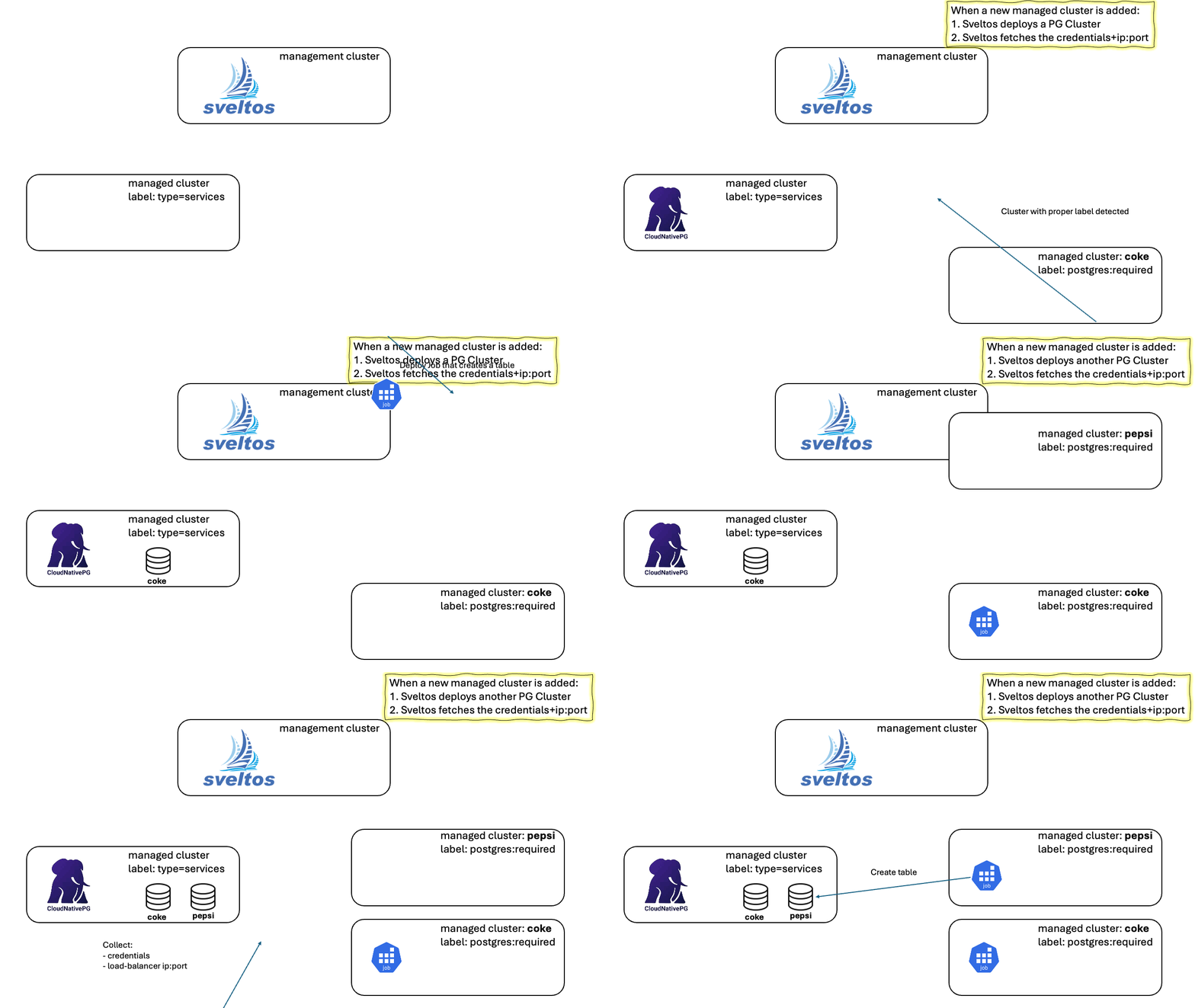
A Civo cluster serves as our management cluster. Another Civo cluster, labeled as type=services, is dedicated to automatic Postgres DB deployment by Sveltos.
The Postgres DB will be deployed using Cloudnative-pg.
Step 1: Install Sveltos on Management Cluster
For this tutorial, we will install Sveltos in the management cluster. Sveltos installation details can be found here.
$ helm repo add projectsveltos https://projectsveltos.github.io/helm-charts
$ helm repo update

$ helm install projectsveltos projectsveltos/projectsveltos -n projectsveltos --create-namespace
Add Label management Cluster
Label the management cluster using type=mgmt.
Granting Extra RBAC
For this demo, Sveltos needs to be granted extra permission:
kubectl patch clusterrole addon-controller-role-extra -p '{
  "rules": [
    {
      "apiGroups": [
        ""
      ],
      "resources": [
        "configmaps",
        "secrets"
      ],
      "verbs": [
        "*"
      ]
    }
  ]
}'
Step 2: Register Clusters with Sveltos
Ensure access to the managed clusters Kubeconfig files as they will be used during the Sveltos registration process.
$ export KUBECONFIG=/path/to/management/kubeconfig

$ kubectl create ns managed-services
$ sveltosctl register cluster --namespace=managed-services --cluster=services --kubeconfig=<managed cluster kubeconfig> --labels=type=services
More information about the registration options, take a look here.
$ kubectl get sveltoscluster -A --show-labels
NAMESPACE          NAME        READY   VERSION        AGE     LABELS
managed-services   services    true    v1.34.2+k3s1   11m     projectsveltos.io/k8s-version=v1.32.5,sveltos-agent=present,type=services
mgmt               mgmt        true    v1.34.2+k3s1   15m     projectsveltos.io/k8s-version=v1.32.5,sveltos-agent=present,type=mgmt
Step 3: Deploy cloudnative-pg
The following ClusterProfile will deploy Cloudnative-pg in the managed cluster with label type=services.
$ export KUBECONFIG=/path/to/management/kubeconfig

$ kubectl apply -f https://raw.githubusercontent.com/projectsveltos/sveltos/main/docs/assets/cloudnative-pg.yaml
Verify whether the resources have been deployed to the cluster marked with the type=services label.
$ sveltosctl show addons
┌───────────────────────────┬───────────────┬─────────────┬──────┬─────────┬───────────────────────────────┬─────────────────┬────────────────────────────┐
│          CLUSTER          │ RESOURCE TYPE │  NAMESPACE  │ NAME │ VERSION │             TIME              │ DEPLOYMENT TYPE │          PROFILES          │
├───────────────────────────┼───────────────┼─────────────┼──────┼─────────┼───────────────────────────────┼─────────────────┼────────────────────────────┤
│ managed-services/services │ helm chart    │ cnpg-system │ cnpg │ 0.27.1  │ 2026-02-10 09:19:13 +0100 CET │ Managed cluster │ ClusterProfile/deploy-cnpg │
└───────────────────────────┴───────────────┴─────────────┴──────┴─────────┴───────────────────────────────┴─────────────────┴────────────────────────────┘
Step 4: Instruct Sveltos to automatically deploy Postgres DB
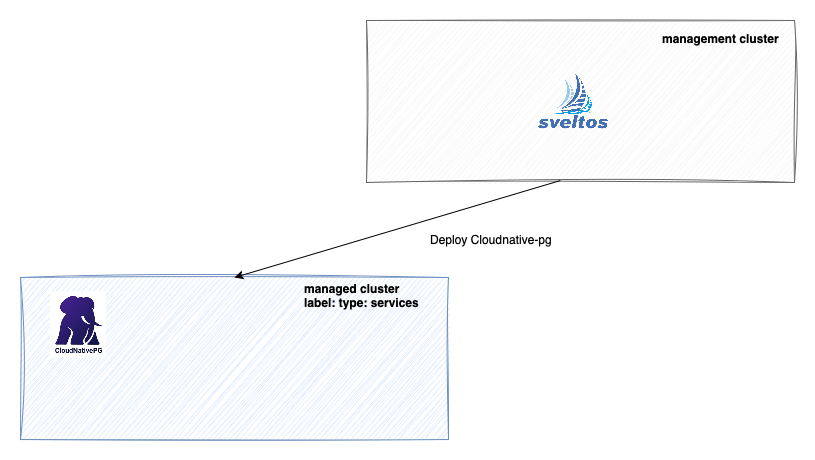
Following configuration will instruct Sveltos to watch for managed cluster with the label set to postgres=required. Anytime such a cluster is detected, Sveltos will perform the points listed below.
- Create a Postgres Cluster instance in the managed cluster with label
type=services. DB will be exposed via aLoadBalancerservice. - Fetch credentials to access the DB.
- Fetch the LoadBalancer service external ip: port
$ export KUBECONFIG=/path/to/management/kubeconfig

$ kubectl apply -f https://raw.githubusercontent.com/projectsveltos/sveltos/main/docs/assets/auto-deploy-postgres-cluster.yaml
$ kubectl apply -f https://raw.githubusercontent.com/projectsveltos/sveltos/main/docs/assets/fetch-postgres-data.yaml
Step 5: Onboard new managed cluster
When a new managed cluster is registered with Sveltos using the label postgres=required, Sveltos will initiate the deployment of a new Postgres database on the type=services cluster.
Once deployed, Sveltos will gather the connection information, including credentials, external IP address, and port number, for this newly created Postgres instance.
Below, we will register a new cluster with Sveltos and assign the label postgres=required.
$ export KUBECONFIG=/path/to/management/kubeconfig

$ kubectl create ns coke
$ sveltosctl register cluster --namespace=coke --cluster=my-app --kubeconfig=<managed cluster kubeconfig> --labels=postgres=required
Verify Sveltos deployed the Postgres Cluster and fetched the info necessary to connect.
$ export KUBECONFIG=/path/to/management/kubeconfig

$ kubectl get secret -n coke
NAME                         TYPE     DATA   AGE
pg-credentials          Opaque   2      0s
The Secret Data section contains similar output as the below.
data:
  password: bTloaW9UYUFBdVE1cFBQY1QzWGN6RDF2R3JUYzF5d3NVRTcwUTJQQXVUaTNucEZhRVdEYXpsZ1pmcnAzYWZwdg==
  user: dG9kbw==
$ export KUBECONFIG=/path/to/management/kubeconfig

$ kubectl get configmap -n coke
NAME                        DATA   AGE
...
pg-loadbalancer-data   2      58s
The ConfigMap Data section contains similar output as the below.
Step 6: Deploy an application that access the Postgres DB
Sveltos can be used to deploy a Job in the coke cluster. This Job will access the Postgres DB in the services cluster.
The Job is expressed as a Sveltos template which will be pre-instantiated and get deployed by Sveltos in any cluster with the matching label type=app.
$ export KUBECONFIG=/path/to/management/kubeconfig

$ kubectl apply -f https://raw.githubusercontent.com/projectsveltos/sveltos/main/docs/assets/job-to-create-table.yaml
Add Label coke Cluster
$ export KUBECONFIG=/path/to/management/kubeconfig

$ kubectl label sveltoscluster -n coke my-app type=app
Note
In this example, we will use the coke cluster to deploy the application.
$ kubectl get sveltosclusters --show-labels -A
NAMESPACE          NAME        READY   VERSION        AGE     LABELS
managed-services   services    true    v1.34.2+k3s1   11m     projectsveltos.io/k8s-version=v1.32.5,sveltos-agent=present,type=services
mgmt               mgmt        true    v1.34.2+k3s1   15m     projectsveltos.io/k8s-version=v1.32.5,sveltos-agent=present,type=mgmt
coke               my-app      true    v1.34.2+k3s1   3m28s   postgres=required,projectsveltos.io/k8s-version=v1.34.2,sveltos-agent=present,type=app
Step 7: Add another managed cluster
Create another managed cluster and register it with Sveltos1. The expected outcome is as follows.
- Sveltos deployed a new Postgres DB in the
servicescluster; - Fetched the credentials and external-ip:port info to access the cluster;
- Deployed a Job in the
pepsicluster that creates a table in the DB.
Multi-tenancy scenario
For multi-tenant clusters with a database per tenant, see this tutorial.
-
↩
kubectl create ns pepsi
sveltosctl register cluster --namespace=pepsi --cluster=cluster --kubeconfig=<managed cluster kubeconfig> --labels=postgres=required,type=app